AI email manager for Gmail
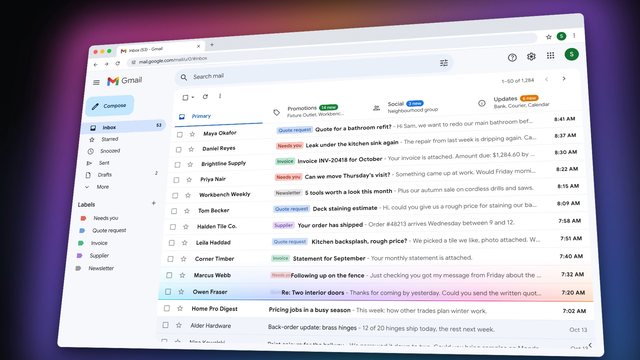
An AI email manager sorts your inbox and drafts your replies. FYNRA's email manager works inside your Gmail: it labels what comes in, drafts replies for you to review and send, and flags what needs you. A support agent can also answer routine customer questions on a topic you choose, within rules you set.
Read film description: AI email manager
Five new messages arrive in a Gmail-style inbox. An AI scan applies labels and groups them. The owner opens a quote request; a reply is drafted for review. The owner presses Send. Captions read ‘Your inbox, sorted’ and ‘Replies drafted for your OK’.
On a fictional business website, a customer opens Contact support, selects Booking issue and Change my appointment, explains that they are away on Thursday and submits the request. An automated support email arrives offering three sample alternatives: Monday at 9, Tuesday at 1 or Wednesday at 4. The caption reads ‘Support that answers instantly’. The final line is ‘AI email manager and support agent’. This is a demonstration, not an actual exchange or a guaranteed response time.
See it working
Labels what comes in, drafts the replies and flags what needs you. You review each draft and press send. Support agents can answer routine questions within rules you set.
An illustrative demonstration with sample data, not a client result.
What the AI email manager does
It keeps the inbox in order and writes the first draft, so your time goes to the emails that need you.
Labels what comes in
New email is sorted into labels, such as quote requests, invoices and newsletters, so the inbox reads at a glance.
Drafts your replies
Replies are drafted and wait in Gmail. You read each one, change what you like and press send.
Flags what needs you
Messages that need a person, like an unhappy customer, are flagged so they do not get buried.
Answers routine support questions
An optional support agent answers routine questions on a topic you choose, such as booking changes, within rules you set.
How the AI email manager works
From a new email to a reply you are happy to send.
Gmail
The email manager works inside your own Gmail account, so you keep the inbox you already know.
Sorted and drafted
New email is labelled, replies are drafted and anything that needs you is flagged.
Your OK
You read each draft and change what you like. Drafted replies wait for your OK by default.
Sent
You press send. A support agent, if you add one, answers on its own only on the topic and within the rules you set.
What to expect
Who it suits, what is included, how long setup takes and how you stay in control.
Who it is for
- Owners who spend hours a day in Gmail
- Businesses that answer the same questions by email again and again
- Teams whose important emails get buried under newsletters and invoices
- Businesses that want routine support requests answered quickly
What is included
- Labels set up around the email your business actually gets
- Drafted replies that wait in Gmail for your review
- Flags on the messages that need a person
- An optional support agent for routine questions, within rules you set
- Everything on your own Gmail account
- Team training and check-ins after launch
How long setup takes
Most single systems, like an AI email manager, go live within two to four weeks. Your written proposal states the timeline before we start.
How you stay in control
Drafted replies wait for your OK by default: you review each one and press send. If you add a support agent, it answers on its own only on the topic and within the rules you set. Everything runs on your own Gmail account and stays with you if we ever stop working together.
Good to know
The questions owners ask most about an AI email manager.
An AI email manager sorts your inbox and drafts your replies. FYNRA's email manager works inside Gmail: it labels incoming email, drafts replies for you to review and send, and flags what needs you.
Not by default. Drafted replies wait for your OK, and you press send. A support agent can answer routine questions on its own, but only on the topic and within the rules you set.
Yes. The email manager works inside your own Gmail account, so you keep using the inbox you know.
Usually not. We build around what you already pay for, like Gmail, your calendar and your CRM, and connect them.
Most single systems go live within two to four weeks. Your proposal states the timeline before we start.
It depends on the build. After a free consultation you get a written proposal with clear pricing, any ongoing costs and exactly what is included.
Related services
Start with the one that saves you the most time, and add the rest when you are ready.
AI receptionist
Picks up every call, day or night.
AI lead generation
Finds the businesses that fit and researches them.
AI for auto shops and detailers
Missed-call text-back, an AI front desk, a CRM and ad tracking for tint, PPF, ceramic and detailing shops.
All services
The six AI systems we build most often, plus automations and AI consulting.
Tell us what slows you down.
Book a free consultation. We will show you what we would build and what it would cost.